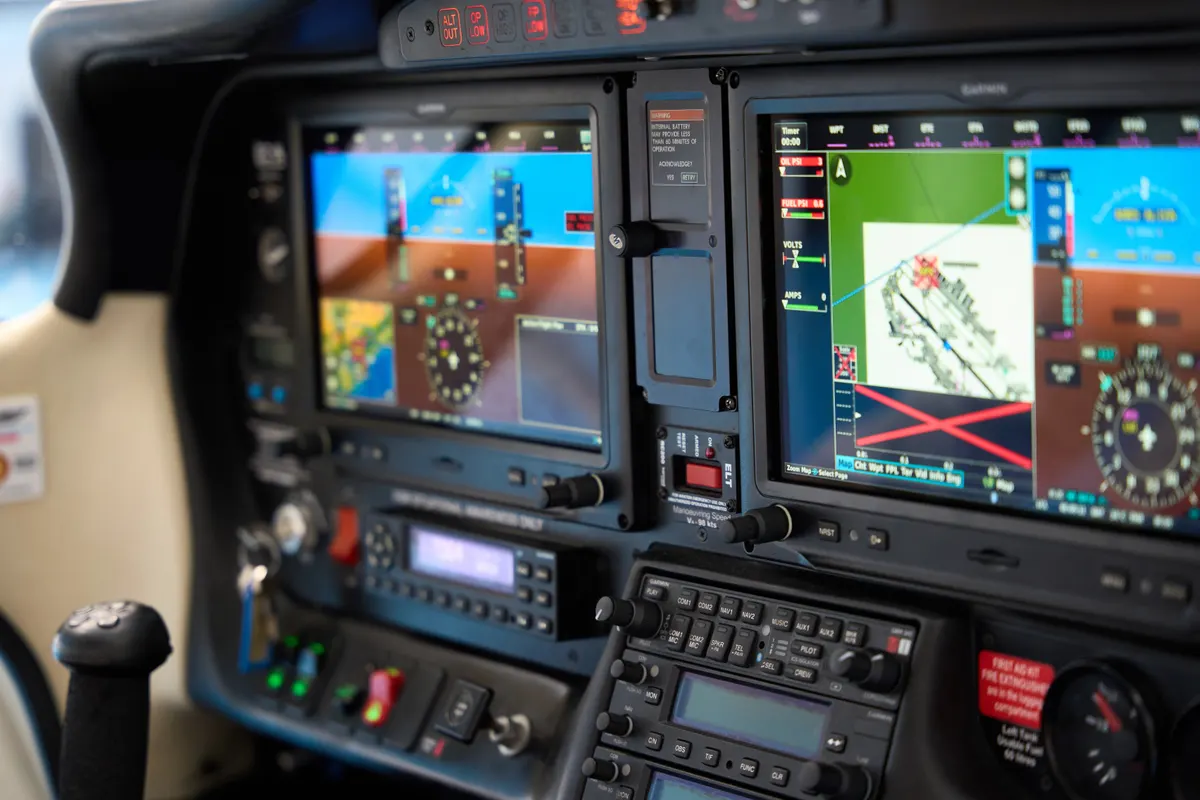
Aircraft cockpits come in two broad types: traditional analog cockpits with round gauges, and glass cockpits with electronic flight displays. The FAA's name for the glass kind is electronic flight displays, made up of primary flight displays and multi-function displays.
This guide shows how each type gets its information, what a pilot sees, what fails in each, and the FAA's guidance on managing automation.
Key Takeaways
Analog cockpits have separate round dials. The airspeed indicator, altimeter and vertical speed indicator run off the pitot-static system, while the attitude and heading indicators and the turn coordinator use gyroscopes.
A glass cockpit combines the flight instruments on a primary flight display (PFD) and puts maps and engine data on a multi-function display (MFD).
Electronic instruments fail less often than analog ones, but the FAA warns that pilots can lose skills and awareness by leaning on automation.
A technically advanced aircraft has a PFD, an MFD with GPS, traffic and terrain, and an integrated autopilot.
Analog Cockpits
An analog cockpit has a separate dial for each instrument. Whether the instruments are analog or digital, the FAA sorts them into three groups: performance instruments, which show what the aircraft is doing (altimeter, airspeed, vertical speed, heading, turn and slip); control instruments, and navigation instruments. The classic arrangement is the six-pack of flight instruments, covered in our guide to the six-pack, with engine gauges, radios and a GPS around it. Many trainers and older airplanes still fly this way.
Pitot-static instruments
The pitot-static system uses two kinds of pressure. Static pressure is the ambient barometric pressure around the aircraft. Dynamic pressure exists only when the aircraft moves through the air, or the wind blows over it. The pitot tube catches total pressure, static plus dynamic. The airspeed indicator uses the pitot tube and static ports to leave only the dynamic pressure, while the altimeter and the vertical speed indicator use only the static ports.
Pitot-static instruments and what blocks them (FAA Pilot's Handbook, Chapter 8)
Instrument
What it senses
If something blocks the system
Airspeed indicator
Pitot (total) pressure compared with static pressure.
A blocked pitot tube affects only this instrument. A blocked static port affects the airspeed indicator, altimeter and vertical speed indicator.
Altimeter
Static pressure, using sealed aneroid wafers.
With a blocked static port, trapped pressure freezes the altimeter at the altitude where the blockage occurred.
Vertical speed indicator
Static pressure.
With a blocked static port, it shows a continuous zero.
Blockage can come from moisture, ice, dirt or even insects. That's why preflight includes removing the pitot cover and checking the openings, and why some aircraft have pitot heat for visible moisture and an alternate static source in the flight deck. Pressure inside the flight deck is lower than outside, so the alternate source reads slightly differently, and the flight manual lists the errors. An aircraft without an alternate source can use the last-resort method in the handbook: break the glass of the vertical speed indicator, which is the least important static instrument. That most likely renders it inoperative.
Gyroscopic instruments
The turn coordinator, heading indicator and attitude indicator contain gyroscopes. A gyro is dense for its size and spins fast on low-friction bearings, and it has two properties the instruments use. Rigidity in space means it stays in its plane of rotation. Precession is the tilting of a gyro in response to a force, with the reaction coming 90 degrees later in the direction of rotation, which is how a turn rate gets sensed. Precession also introduces small errors, so a heading indicator needs realigning in flight.
A typical vacuum system that spins the attitude and heading indicator gyros has an engine-driven vacuum pump, a relief valve, an air filter, a gauge and tubing. The relief valve keeps suction within limits.
Glass Cockpits
The FAA describes electronic flight displays, commonly called glass cockpits, as displays such as primary flight displays and multi-function displays. Multi-panel digital displays combine all the flight instruments on a single screen, the PFD, and the traditional six-pack is shown on one liquid crystal display.
The handbook lists benefits. Primary electronic instrument packages are less prone to failure than analog ones, and the FAA says solid-state instruments have a failure rate far lower than conventional ones. Designers no longer need cluttered panels to fit everything in. Different software packages configure a display for different aircraft, and manufacturers can upgrade existing displays the same way, without replacing individual gauges.
The primary flight display
A typical PFD layout. Exact positions vary by manufacturer, and the FAA notes that the location of indications varies.
Where the instruments sit on a PFD (FAA Pilot's Handbook, Chapter 8)
Instrument
On the PFD
Airspeed
A vertical tape on the left, with larger numbers descending from the top as speed rises. True airspeed is at the bottom, and V-speeds such as VX, VY and rotation speed are marked. A pilot-set bug marks any chosen speed. The number turns red above VNE.
Attitude
The artificial horizon spans the whole width of the display, bigger than on an analog panel. It gets its data from the attitude heading and reference system (AHRS).
Altitude
A vertical tape on the right, in increments of 20 feet, with the current altitude in a box in the center.
Vertical speed
To the right of the altitude tape, as an arc or a vertical tape, with a vertical speed bug.
Heading
Below the artificial horizon, modeled after a horizontal situation indicator, with data from a magnetometer through the AHRS.
Turn and slip
A turn-rate trend line above the compass card, where a vector reaching the second tick mark means a standard-rate turn, and a slip/skid bar below the roll pointer.
Tachometer
Not on the PFD. It's normally on the MFD, and if a screen fails it moves to the remaining screen.
Air data and AHRS
Glass panels use the same inputs as analog gauges, processed differently. An air data computer (ADC) takes pitot and static pressure plus outside air temperature and works out airspeed, altitude and true airspeed. The AHRS feeds attitude and heading, using accelerometers for coordinated flight reference and a magnetometer for heading.
The displays add trend vectors, which are magenta lines on the airspeed and altitude tapes. The ADC computes the rate of change and shows a projection of where the aircraft will be in six seconds, which pilots use to control airspeed and altitude more precisely.
The multi-function display
The MFD is where the other information lives. It can show a moving map that mirrors sectional charts, with airspace and temporary flight restrictions, plus engine data and, in many cases, traffic, terrain and weather data link. Pilots can also configure what they see. Most systems offer map orientations such as north up, track up, desired track up and heading up.
Technically Advanced Aircraft
In general aviation, the FAA describes an automated aircraft as one with an integrated advanced avionics system: a PFD, an MFD that includes an instrument-certified GPS with traffic and terrain graphics, and a fully integrated autopilot. This type is commonly called a technically advanced aircraft, or TAA, and typically has two display screens, the PFD on the left and the MFD.
The FAA is unusually blunt about glass cockpits. Automation has made flying safer, it says, but it can make some errors more evident and others less so. The handbook describes a study comparing two groups of pilots on the same twin-jet airliner type, one flying an older version with analog instruments and the other a newer version with an electronic flight instrument system and a flight management system. When asked to fly manually, the group used to the electronic panel showed some erosion of skills. They went heads down to solve a crossing restriction on the computer, and they had a harder time on emergency maneuvers without the flight director.
The FAA's advice follows from that.
Keep hand-flying. Pilots of automated aircraft should occasionally disengage the automation and fly manually to keep stick-and-rudder proficiency.
Use the moving map as an aid. The handbook says it's never meant to substitute for a sectional or low-altitude en route chart, and flight manuals prohibit using these displays as the primary data source.
Know the modes. At all times the pilot should know which autopilot modes are engaged and which are armed to engage. With some autopilots, changing the navigation source while in NAV mode makes the autopilot default to wing level until the pilot re-engages it.
Stop, look and read. Read the screen before pushing, pulling or twisting a knob.
Check the data. Verify every programmed entry before departure and match it to a paper log, and use callouts, even when flying alone.
Keep monitoring. The handbook says humans are poor monitors of automated systems, and the more reliable the system, the poorer the monitoring.
The FAA also found that advanced-avionics accidents mostly weren't caused by the aircraft. Pilot inexperience and chains of poor decisions were the pattern, and continued VFR flight into instrument conditions was a consistent theme. Its example is a 1999 accident in Colombia in which a crew entered a waypoint incorrectly by one degree. The flight management system flew exactly what it was told, on a path that ended 60 nautical miles off the intended course, in a mountain.
Analog or Glass: What to Learn On
Many students learn on analog panels and move to glass later, and the basics carry across, because either way the same flight information is shown in different forms. For the other systems behind the panel, see electrical systems, antennas and aircraft lighting.
Frequently Asked Questions
What's a glass cockpit?
A cockpit with electronic flight displays instead of round analog gauges. The FAA describes them as primary flight displays and multi-function displays.
What's a PFD?
A primary flight display, one screen that combines the traditional flight instruments. The airspeed tape is on the left and the altitude tape on the right.
What does an MFD show?
A multi-function display shows other information such as moving maps and engine data. The FAA notes the tachometer is normally displayed there.
What's a technically advanced aircraft?
An airplane with a PFD, an MFD with instrument-certified GPS with traffic and terrain graphics, and a fully integrated autopilot.
Are glass cockpits more reliable than analog gauges?
The FAA says primary electronic instrument packages are less prone to failure than analog ones. It also warns that over-reliance on automation can erode manual flying skills.
What happens if the static port blocks?
The airspeed indicator becomes inaccurate, the altimeter freezes at the altitude where the blockage occurred and the vertical speed indicator reads zero. Some aircraft have an alternate static source in the flight deck.
Keep PilotPassion in your Google results
Add us as a preferred source and we are more likely to appear in your Top Stories.